
.png)
Description
Download ZeroGPT CC – Accurate AI Content Detection Tool
Overview of ZeroGPT CC
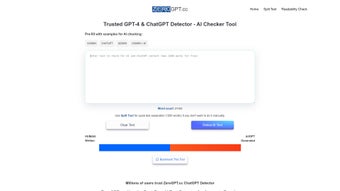
In today’s digital landscape, the line between human‑written and machine‑generated text is blurring faster than ever. Content creators, educators, marketers, and publishers are all looking for a reliable way to confirm the origin of a piece of writing before it goes public. ZeroGPT CC answers that call with a web‑based AI content detection engine that promises more than 98 % accuracy across a broad spectrum of AI models, including GPT‑4, GPT‑3, Google Bard, Claude, and emerging open‑source generators. The service is built around a privacy‑first philosophy: no text is ever stored on permanent servers, and every analysis runs in a transient environment that deletes the input immediately after the report is generated. Users simply paste or upload a document, click “Analyze,” and receive a clear visual breakdown that shows the percentage of human versus AI‑generated content, a confidence interval, and a heat‑map highlighting suspect passages. Multi‑language support extends the tool’s usefulness to non‑English speakers, covering major languages such as Spanish, French, German, Chinese, and many others. Whether you are a freelance writer double‑checking client drafts, a university professor safeguarding academic integrity, or a brand manager ensuring that marketing copy aligns with corporate standards, ZeroGPT CC provides a fast, secure, and easy‑to‑use solution that fits seamlessly into any workflow. With millions of global users already trusting its precision, ZeroGPT CC has quickly become the go‑to utility for anyone who needs to verify content authenticity in a world increasingly populated by sophisticated AI writers.
Key Features and Platform Compatibility
What Sets ZeroGPT CC Apart
- High Detection Accuracy: Consistently delivers >98 % reliability across a wide range of AI models and writing styles.
- Instant Results: Generates a full analysis in seconds, even for documents approaching the 20,000‑character limit.
- Multi‑Language Support: Accurately evaluates content in English, Spanish, French, German, Chinese, Portuguese, Italian, Russian, and many other languages.
- Model‑Agnostic Detection: Recognizes outputs from GPT‑4, GPT‑3, GPT‑4 Turbo, Google Bard, Claude, and the latest open‑source generators.
- Privacy‑First Architecture: No user data is retained; processing occurs in a temporary environment that is wiped clean after each scan.
- Bulk Upload Capability: Paid subscribers can upload multiple files via CSV or ZIP for batch processing, saving valuable time on large projects.
- Robust API Access: Developers can embed detection directly into LMS, CMS, or custom workflows with a simple RESTful interface.
- Detailed Reporting: Provides a percentage score, confidence interval, and an interactive heat map that highlights the exact sentences flagged as AI‑generated.
Operating System and Browser Compatibility
ZeroGPT CC is delivered as a cloud‑based web application, meaning it runs on any device that supports a modern browser. Whether you are on Windows 10/11, macOS Ventura, a popular Linux distribution, or mobile platforms such as Android 13 or iOS 17, you can access the service through Chrome, Firefox, Safari, or Edge without installing additional software. The responsive design adapts fluidly to desktops, tablets, and smartphones, ensuring the same intuitive experience regardless of screen size. For power users and developers, the API can be called from server‑side environments on Windows, macOS, or Linux, making ZeroGPT CC a versatile addition to any technology stack.
Installation, Setup, and How to Use ZeroGPT CC Effectively
Step‑by‑Step Onboarding (Web Access)
Because ZeroGPT CC is a SaaS solution, there is no traditional download or installation required. Getting started is as simple as visiting the official website and creating an account if you need higher limits or API access. Follow these steps for a smooth onboarding experience:
- Visit the portal: Open any modern browser and go to https://zerogpt.com.
- Create an account (optional): The free tier allows anonymous scans, but registering unlocks higher daily limits, bulk‑upload functionality, and an API key.
- Verify your email: Click the verification link sent to your inbox to enable password recovery and receive usage notifications.
- Select a plan: The free plan offers 10 analyses per day. Paid plans start at $9.99 / month for unlimited scans, priority processing, and API credits.
- Generate an API token (if needed): After logging in, navigate to the “Developer” tab, create a token, and store it securely for integration with your own tools.
Running an Analysis
Once logged in, you’ll land on a clean dashboard with a large text box labelled “Paste your content here.” Here’s how to maximize the accuracy of each scan:
- Paste or upload the full document: You can paste up to 20,000 characters directly or click “Upload File” to select a .txt, .docx, or .pdf file.
- Choose the correct language: If the content isn’t English, select the appropriate language from the dropdown to improve detection precision.
- Start the scan: Hit the “Detect AI” button. The backend instantly runs statistical and deep‑learning classifiers on the input.
- Read the results: Within seconds you’ll see a score such as “73 % Human / 27 % AI” accompanied by a confidence bar. Hover over highlighted sections to see why the engine flagged them (e.g., repetitive phrasing, low‑entropy sentences).
- Export the report: Use the “Download Report” button to save a PDF or CSV summary for sharing with colleagues, students, or clients.
Best Practices for Reliable Detection
While ZeroGPT CC is powerful out‑of‑the‑box, following a few best‑practice guidelines will ensure the most trustworthy outcomes:
- Always submit the complete, original text; trimming sections can skew the percentage.
- Avoid pasting HTML, markdown, or other markup—plain text yields cleaner analysis.
- If you suspect a mixed document (part human, part AI), run separate scans on each segment to pinpoint the exact source.
- Leverage the API for automated batch processing when dealing with large volumes of student essays, marketing copy, or user‑generated content.
- Regularly review the heat‑map visualizations to understand the linguistic patterns that trigger AI detection, which can also help improve your own writing style.
Pros, Cons, Frequently Asked Questions, and Final Verdict
Pros & Cons
- Pros:
- Exceptional detection accuracy (>98 %).
- Instant results with a clean, user‑friendly interface.
- Supports many languages and major AI models.
- Privacy‑first design; no data retention.
- Generous free tier and affordable paid plans.
- Robust API enables integration into LMS, CMS, and custom workflows.
- Bulk upload option for power users.
- Detailed visual reports with heat‑maps.
- Cons:
- Free tier limited to 10 daily scans, which may be insufficient for heavy users.
- Bulk‑upload feature requires a paid subscription.
- Detection of brand‑new AI models may lag until the next update.
- Web‑only interface; no offline desktop client.
Frequently Asked Questions (FAQ)
-
Is ZeroGPT CC really free to use?
Yes. The free tier allows up to 10 text analyses per day without requiring an account. For unlimited scans, bulk uploads, and API access you’ll need a paid subscription.
-
Can ZeroGPT detect text generated by newer models like GPT‑4 Turbo?
ZeroGPT’s detection algorithms are updated regularly. As of the latest release it can identify content from GPT‑4, GPT‑4 Turbo, and other major models. Future updates will extend support as new generators appear.
-
Does ZeroGPT store the text I submit?
No. All inputs are processed in a transient environment and are deleted immediately after the analysis, ensuring complete privacy.
-
How does the API pricing work?
API usage is billed per 1,000 characters analyzed. The standard rate starts at $0.02 per 1,000 characters, with volume discounts available for large‑scale deployments.
-
Can I integrate ZeroGPT with my LMS (Learning Management System)?
Absolutely. Using the API key you can embed detection checks directly into Moodle, Canvas, or any custom LMS, enabling automated authenticity reports for student submissions.
Conclusion & Call to Action
In a world where AI‑generated content is proliferating at an unprecedented pace, having a trustworthy detector is no longer optional—it’s essential. ZeroGPT CC delivers on its promise of high‑precision detection, lightning‑fast response times, and stringent privacy safeguards. Its multi‑language capabilities and model‑agnostic design make it a versatile ally for writers, educators, marketers, and developers alike. While the free tier’s daily limit may feel restrictive for power users, the reasonably priced subscription plans unlock bulk‑upload, API access, and unlimited scans, providing excellent value for the investment.
If you need to confirm the authenticity of any piece of text—whether it’s a client brief, a research paper, a blog post, or a social‑media update—ZeroGPT CC is ready to help. Download ZeroGPT CC today, start your free trial, and enjoy the peace of mind that comes from knowing exactly where your content originates.
Guides & Tutorials for ZeroGPT CC
How to install ZeroGPT CC
- Click the Preview / Download button above.
- Once redirected, accept the terms and click Install.
- Wait for the ZeroGPT CC download to finish on your device.
How to use ZeroGPT CC
This software is primarily used for its core features described above. Open the app after installation to explore its capabilities.
User Reviews for ZeroGPT CC 0
No reviews found




